Ambrose for Slack
Flavor and food R&D, right inside Slack
Put a flavor chemist and food scientist in your workspace. Ask @Ambrose about aroma compounds, substitutions, shelf life, or regulatory status, and run formulation tools without leaving Slack. Every FEMA, CAS, and GRAS number comes from a verified 46,096-ingredient database, not a language model’s guess.
 No account needed to start. Free to install.
What is Ambrose for Slack?
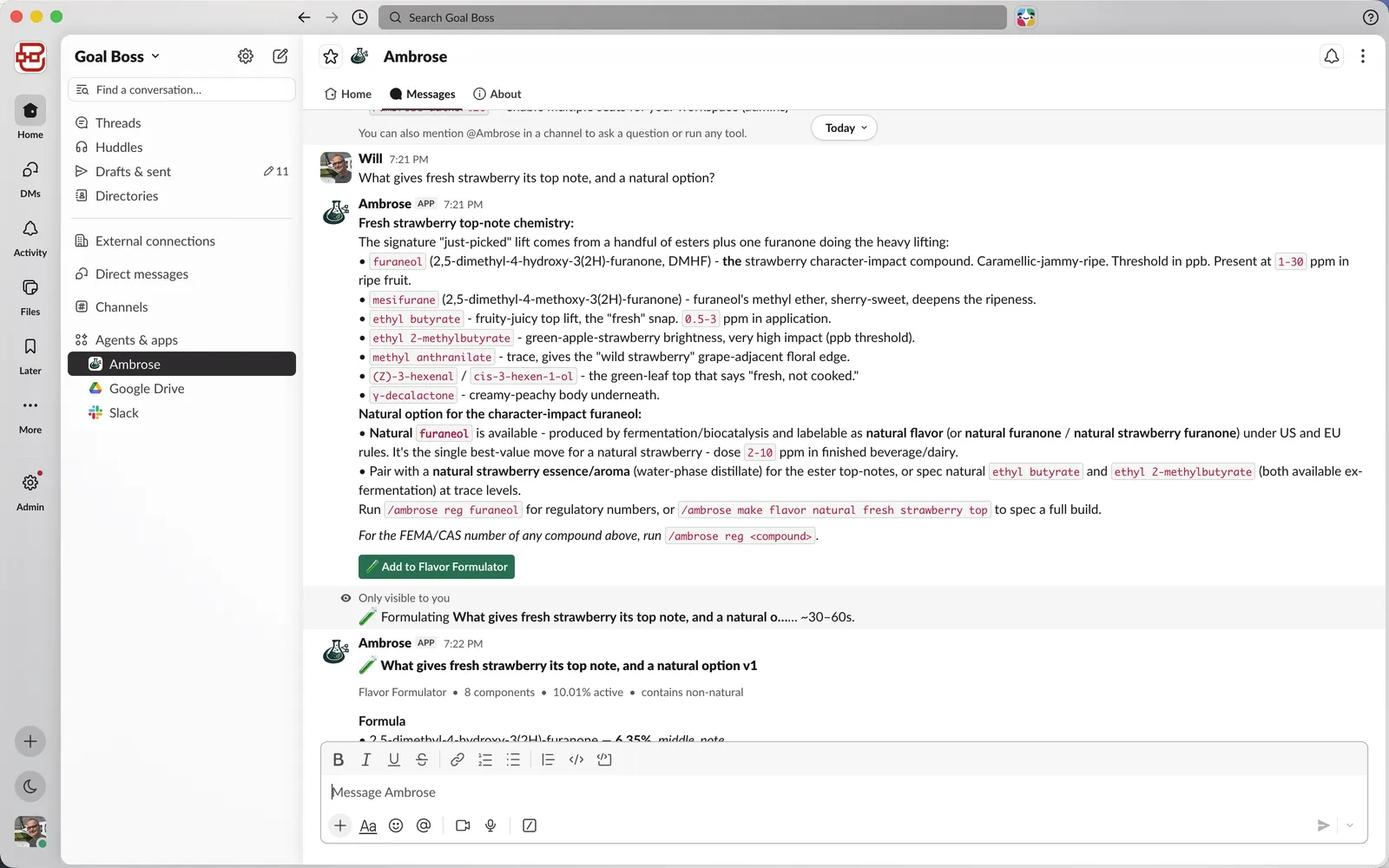
Ambrose for Slack is a Slack app for flavor and food-product R&D teams. Mention @Ambrose in any channel or direct message to ask about flavor chemistry, or run a /ambrose command to look up an ingredient, design a flavor or an application, check shelf life, or generate an FDA nutrition label. Answers name specific compounds and give dose ranges, and formulas you build save to your Ambrose lab at ambroseflavor.com.
Ask a question
Flavor chemistry, answered with real compounds
Ask what gives fresh strawberry its top note, how to substitute a constrained ingredient, or which esters carry a ripe-banana character. Ambrose replies with named compounds and dose ranges in parts per million, and points you to the exact command for the regulatory numbers. It is built for people who need a molecule, not a paragraph about “fruity notes.”
- • Character-impact compounds by name, with typical ppm
- • Natural and synthetic options side by side
- • Works in a channel with your team, or in a private DM
Look it up
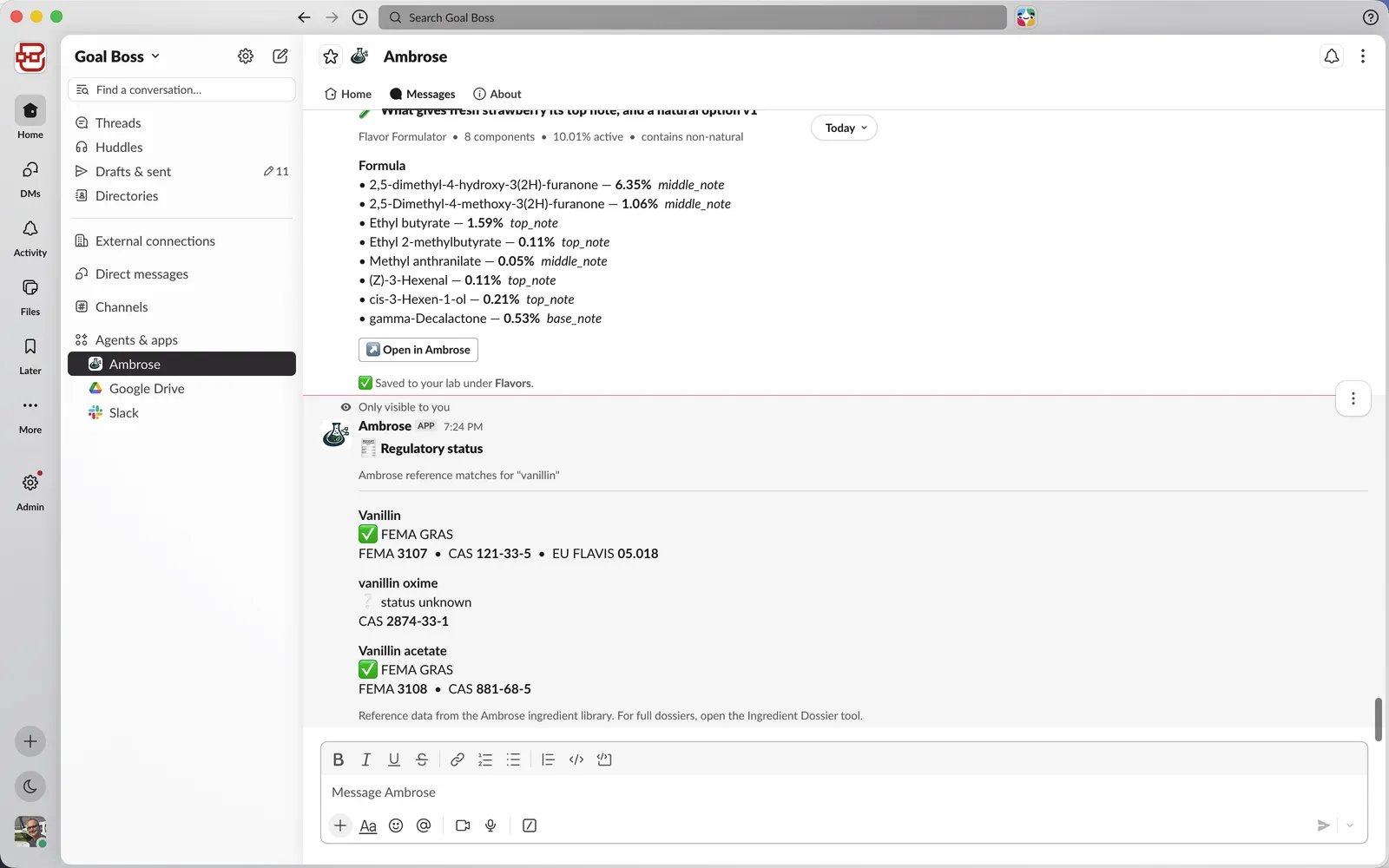
FEMA, CAS, and GRAS from a verified database
Run /ambrose reg vanillin and get the GRAS status plus FEMA 3107 and CAS 121-33-5, read straight from Ambrose’s ingredient library. The numbers you paste into a spec sheet are the ones that came out of the record. Ambrose surfaces regulatory status; it does not replace your own compliance review.
46,096
ingredients, fully profiled
635
CFR sections referenced
Build it
Describe a target, get a formula
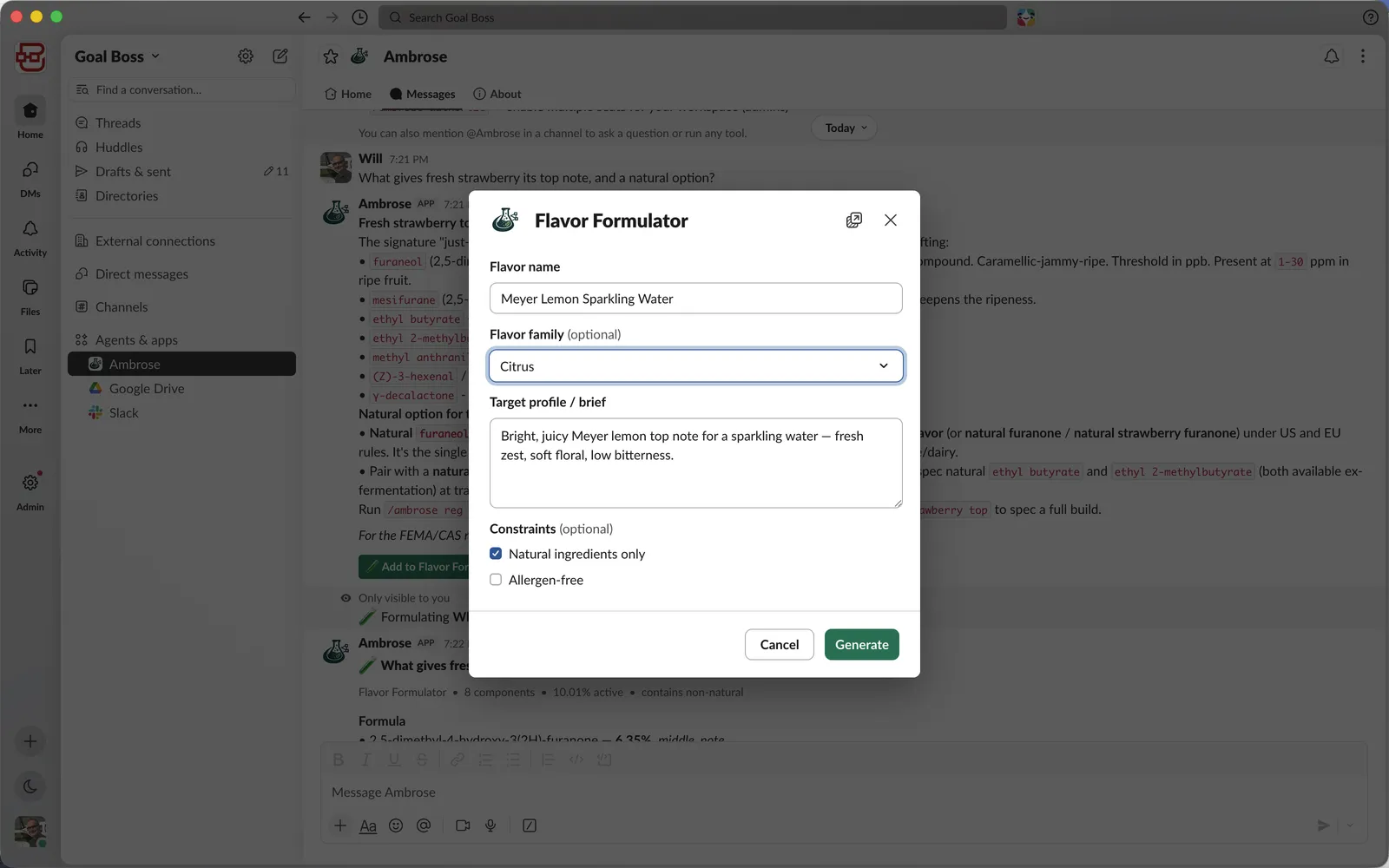
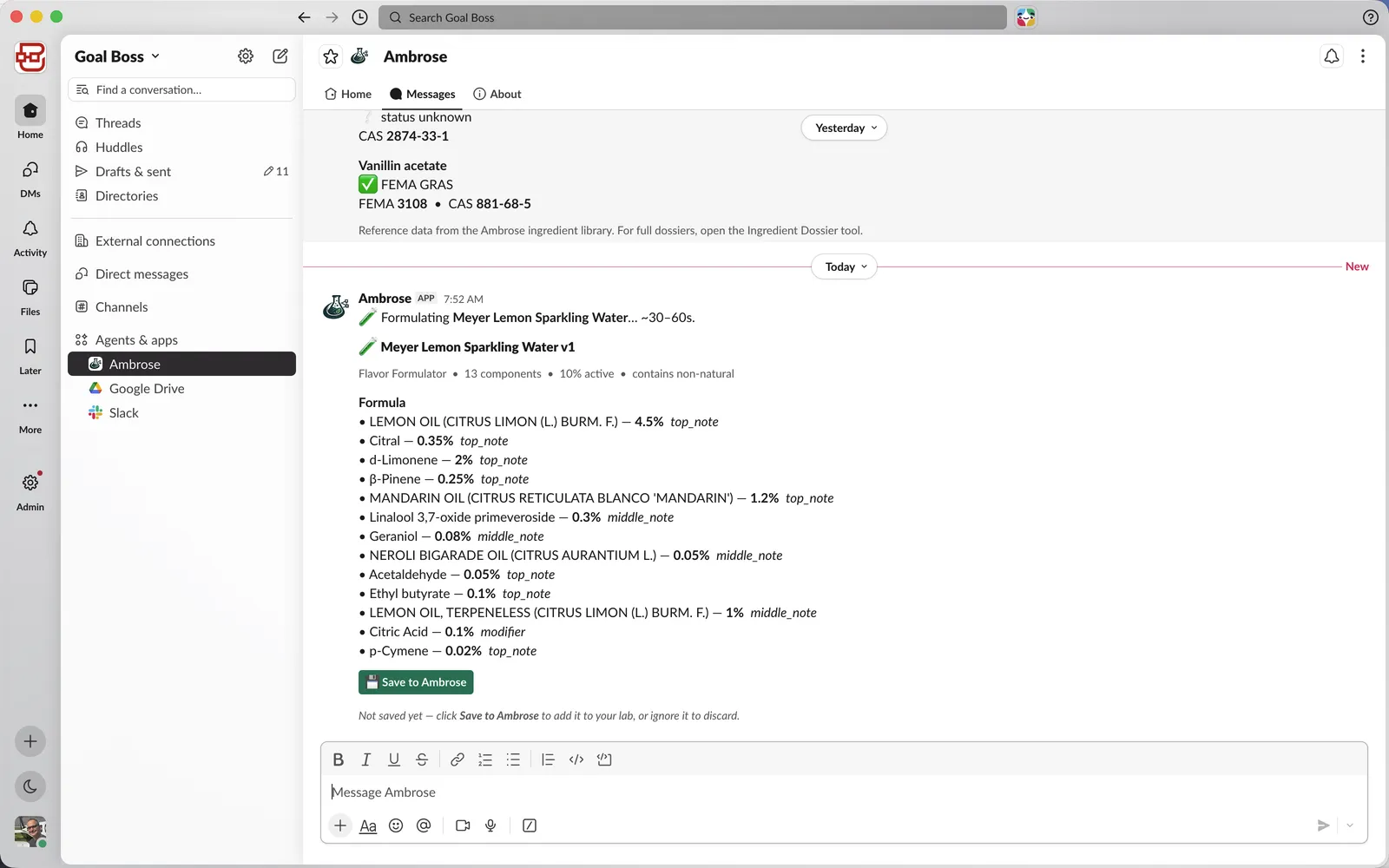
Run /ambrose make flavor, describe a target profile, and Ambrose returns an aroma system: each component with its percentage and note role, drawn from the real ingredient catalog and balanced to 100 percent. Save it and the formula lands in your Ambrose lab, ready to open and adjust. The same flow builds a full application recipe for a beverage, bar, bake, or sauce.
The whole toolkit
A flavor and food R&D toolkit, in Slack
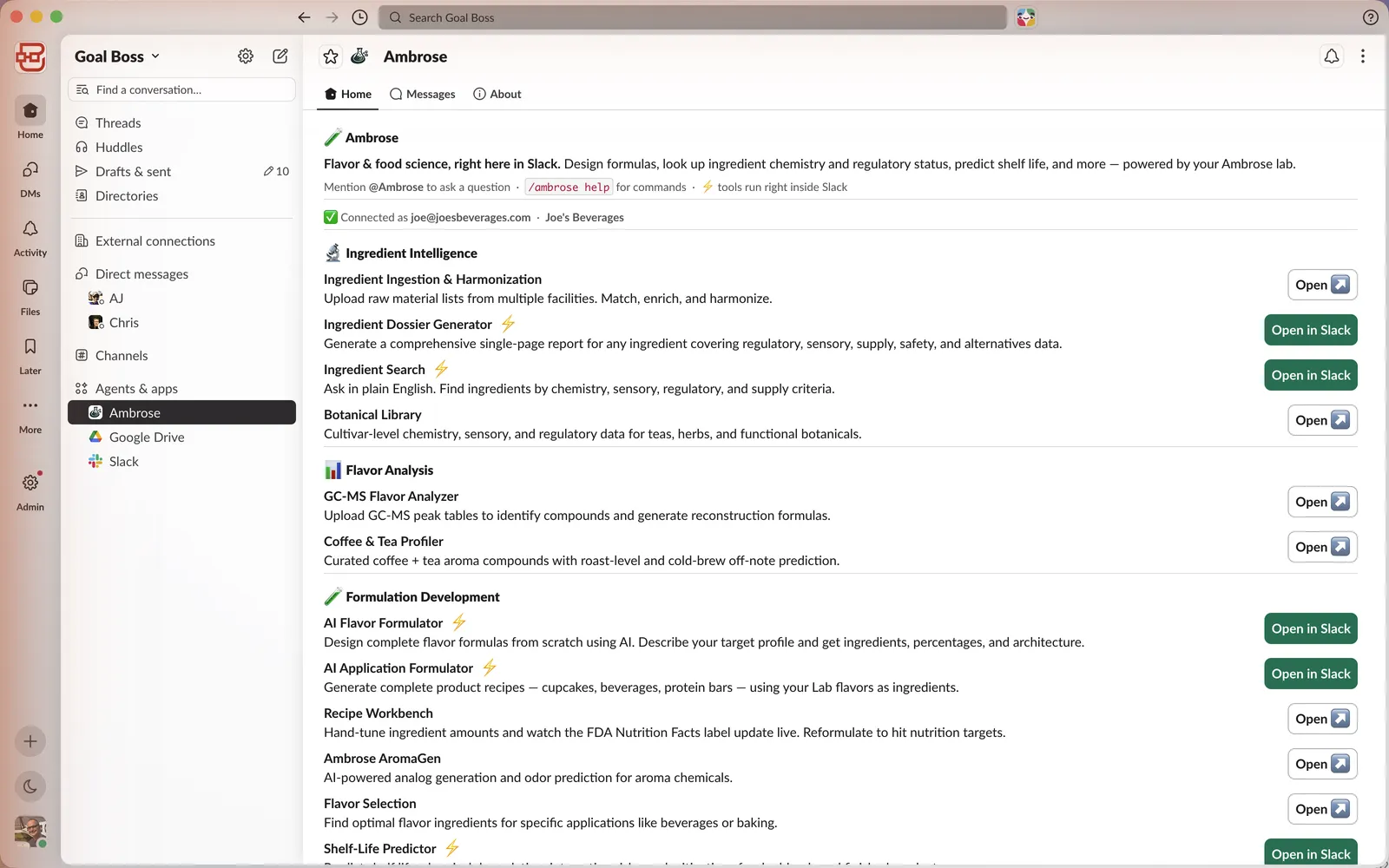
Beyond the bot, the App Home tab lists every tool your team can open. Pull a single-ingredient dossier, search by chemistry or sensory criteria, swap a problem ingredient for a close analog, predict shelf life, or generate an FDA Nutrition Facts panel. Tools run inside Slack, and anything they build is saved to your Ambrose lab.
- Ingredient dossiers
- Chemistry and sensory search
- Problem-ingredient substitution
- Shelf-life prediction
- Flavor formulator
- Application formulator
- FDA nutrition labels
- Regulatory status lookup
The numbers come from the record
Most chat tools will happily invent a FEMA number. Ambrose does not. Every regulatory identifier it shows is resolved from its verified ingredient database and reconciled to the authoritative record, so the model names the compound and the system supplies the figure. Ask for one and Ambrose returns the record, or tells you it has none on file.
Get started in a minute
Install once; anyone in your workspace can use it.
Add to Slack
Install Ambrose to your workspace with the button below. Any workspace admin can do it.
Connect
Run /ambrose login to link your Ambrose account, or sign in with Slack.
Ask and build
Mention @Ambrose or run /ambrose help to see everything.
Questions? Email [email protected] or see Support. We handle your data as described in our Privacy Policy.
Frequently asked questions
What can @Ambrose do in Slack?+
Answer flavor-chemistry questions with named compounds, look up FEMA, CAS, EU FLAVIS, and GRAS status, design a flavor or a full application recipe, pull a single-ingredient dossier, suggest substitutions, predict shelf life, and generate an FDA Nutrition Facts label, all inside Slack.
Where do the FEMA and CAS numbers come from?+
From Ambrose’s verified ingredient database. The model names a compound and the system supplies the identifier from the record, reconciled to the authoritative source. If Ambrose has no record for a compound, it says so.
Is it free?+
Installing is free. The FDA Nutrition Facts label tool and a rate-limited @Ambrose are included at no cost. Teams add the formulation and regulatory tools to their plan one at a time as they need them.
Do formulas built in Slack save anywhere?+
Yes. Flavors and applications you build in Slack save to your Ambrose lab at ambroseflavor.com, where you can open, adjust, and screen them with the rest of the toolkit.
Can the whole team use it in one channel?+
Yes. Invite @Ambrose to a channel and anyone can mention it to ask a question or run a tool, and the results post where the conversation is happening. It also works in a direct message with the bot.
What data does Ambrose access?+
Only messages addressed to the app: a direct message to @Ambrose or a message that mentions it. Ambrose does not read general channel history. Details are in the Privacy Policy.
Bring a flavor chemist into your workspace
Add Ambrose to Slack and keep ingredient chemistry and regulatory data one message away.